
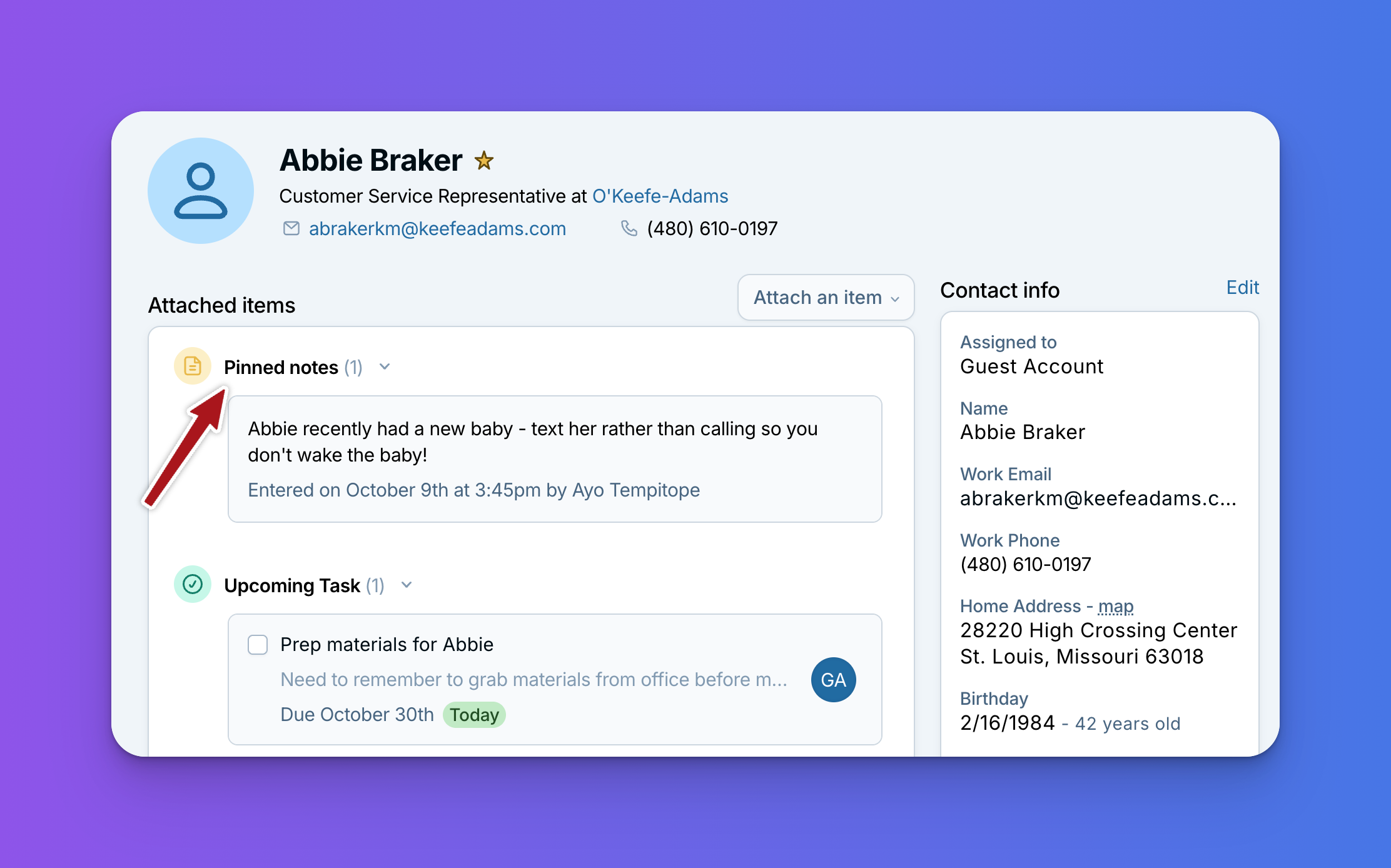
Pinned notes is one more feature our developers built during Cupholder Week, based on your requests. See the rest of the new features here: Product Roundup: 6 New Features from Cupholder Week
Some details matter most right now: "Waiting on the signed contract. Don't send the invoice yet." "Paused their weekly service until spring." Whether it's a reminder to yourself or a heads-up for your team, you want it front and center the moment you open a contact. So many of you have asked for a way to keep notes like these from getting pushed down the history as new activity comes in. We're happy to say you can now pin notes so they stay right at the top!
What it does
Pin any note on a contact or company, and it stays at the top of the record, right under Attached items, no matter how much new history gets added. The note also keeps its usual spot in the history, with a small tag so you can tell it's pinned.
You can pin any note saved on a contact or company. (Notes saved inside a pipeline item can't be pinned.)
You can have multiple pinned notes on a record, so a few key details can all live up top together.
If you share your CRM with a team, pinned notes are visible to everyone, which makes them a great way to share what's going on with a client right now.
Pinned notes or Background info?
If you already use the Background info field, here's an easy way to think about the two: Background info is great for the permanent stuff, like how someone prefers to be contacted or how you met. Pinned notes are for what you (or your team) need to know right now. Each one shows who wrote it and when, so everyone can see where the info came from and how recent it is. Pin something while it matters, then unpin it when it doesn't.
Why it's handy
- What's happening now comes first: The details that matter right now are the first thing you see when you open a contact.
- Handy for teams, too: If you share your CRM, whoever opens the record sees the same details first, so nobody has to track down a teammate to ask.
- Less digging: No more scrolling back through months of history to find that one note.
Ideas for what to pin
Not sure where to start? Here are a few ways different businesses might use pinned notes:
- 🏠 Home services: "Kitchen remodel starts November 10. Crew parks on the street, not the driveway."
- 🏡 Real estate: "Under contract on the Maple Street house. Hold off on sending new listings until closing on December 12."
- 📊 Financial and insurance: "Reviewing coverage options before the January 1 renewal. Hold off on new quotes until we hear back."
- 🤝 Nonprofits: "Considering a year-end matching gift. Check with Jordan before any outreach."
- 📦 Wholesale and B2B: "Hold new orders until the October invoice is paid."
- 💼 Consultants and agencies: "Main contact is out on Fridays until the project wraps, so loop in Dana for anything urgent."
- 🔄 Team handoffs: "Account moved from Sam to Priya in October. Read Sam's summary note before the next call."
A good rule of thumb: pin what's true right now that you'd want to know in the first ten seconds of opening a record. When something stops being true, just edit or unpin the note so the top of the page stays current.
How to pin a note
- Save your note on the contact or company like you normally would. (Here's how to save a note if you'd like a refresher.)
- Hover over the note in the history and select Pin to top of page.
That's it! To edit or unpin it later, hover over the pinned note at the top of the page, select the three dots, and choose the option you want. You can also unpin a note right from the history by selecting its pinned tag.
For a full walkthrough, check out our help article on pinning a note.
Pinned notes work the same way in the mobile app, too. You'll find them at the top of the record, under Attached items.
Thank you!
Thanks to everyone who asked for pinned notes. We built this because of you, and we can't wait to hear how you use it! Email us at help@lessannoyingcrm.com with questions or feedback.
Sign up to receive updates in your inbox